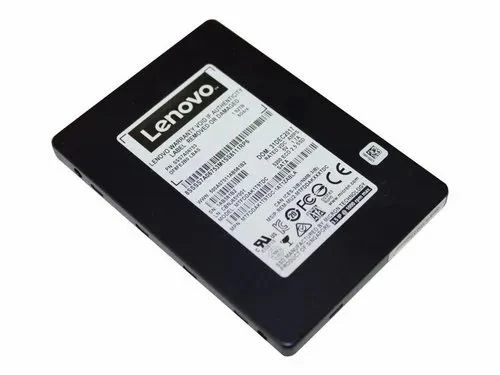

Solid State Drives present a multitude of advantages like enhanced boot times, accelerated file transfers, and heightened system responsiveness. Understanding the benefits of SSD storage holds significant importance for individuals belonging to diverse occupational domains, including professionals aiming to enhance their productivity and gamers desiring seamless gameplay experiences.
Let’s find out if SSD storage can improve the performance of your pc by reading through the points below.
Loads The OS Much Faster
SSD storage exhibits superior speed in loading the operating system when juxtaposed with conventional HDDs. The superiority of solid-state drives over hard disk drives in terms of data access speeds can be attributed to their utilisation of NAND flash memory for data storage, as opposed to the spinning disks employed by HDDs.
These are some reasons why SSDs load the OS faster:
No Moving Parts
Hard Disk Drives encompass mechanical components that necessitate physical movement in order to retrieve data, unlike solid state drives that are devoid of any moving parts. This implies that SSDs are capable of retrieving data with nearly instantaneous access, whereas hard disk drives are obligated to await the rotational disk's alignment with the requisite position.
Fast Read/Write Speeds
The read and write speeds of solid-state drives surpass those of hard disk drives significantly. This feature enables them to efficiently access and load the operating system files into memory.
Random Access Time
SSDs exhibit remarkably reduced random access times, enabling them to swiftly retrieve data from any location on the drive, thereby minimising latency. Hard disk drives, conversely, exhibit elevated random access times as a consequence of the physical displacement required by the read/write head.
Cashing
In contemporary practice, caching methodologies are commonly employed by a considerable number of contemporary solid-state drives to enhance the efficiency of recurring data loading instances, such as operating system files. Furthermore, this leads to a decrease in the duration required for the operational system to start.
Extended Lifespan
SSD storage utilises NAND flash memory as the primary storage medium for data. They possess the capability of preserving data integrity in the absence of power supply. In contrast to the spinning platters of HDDs, the reliability of the alternative technology is enhanced and vulnerability to physical damage is reduced. Solid-state drives possess the capacity to facilitate a functionality commonly referred to as TRIM, which serves to bolster the drive's overall performance and prolong its overall lifespan. The TRIM function facilitates the identification and designation of unutilized data blocks as accessible for the storage of fresh data, thereby diminishing the occurrence of write amplification and promoting wear levelling.
Speedy File Transfers
Solid-state drives employ an equitable dissemination of data among their memory cells, thereby facilitating the preservation of consistent read and write rates. The process enables concurrent access and transfer of information within several NAND flash memory chips, thereby facilitating simultaneous reading and writing operations. This parallelism facilitates enhanced data transfer rates, particularly when dealing with large files or simultaneous transfer of multiple files. Solid-state drives are equipped with a controller that effectively oversees the transmission of data between the NAND flash memory, a type of non-volatile computer memory, and the interface of the computer. Controllers with sophisticated algorithms have the ability to enhance data transfers, leading to enhanced overall performance.
Smoother Multitasking
SSD storage possesses superior efficiency in managing background tasks. During the execution of background processes, such as file indexing or updates, by the operating system or applications, the utilisation of a solid-state drive guarantees a minimal impact on the overall performance of the system.
Advanced Encryption Options
Solid-state drives are equipped with integrated hardware encryption capabilities. This signifies that the encryption and decryption procedures are executed directly on the solid-state drive’s controller, leading to appreciable performance enhancements in contrast to encryption executed through software. Hardware-based encryption is commonly referred to as Self-Encrypting Drives in academic discourse.
Table below shows all the encryption features SSD storage can provide that HDD cannot.
Encryption Features
SSD Storage
HDD Storage
Hardware Encryption
Yes
No
Self-Encrypting Drive
Yes
Limited
Full Disk Encryption
Yes
Limited
Enhanced Security
Yes
No
Fast Encryption/Decryption
Yes
No
Consumes Less Power
Solid state drives exhibit a decreased level of power consumption during periods of inactivity. When data is not actively read or written, solid-state drives transition into a state of reduced power consumption, demonstrating a notable disparity compared to hard disk drives. This can be a beneficial attribute for desktop computers and servers as they are frequently operational for prolonged durations. The decreased power consumption exhibited by solid-state drives not only confers cost savings for individual users in terms of diminished electricity bills, but it also exerts a positive environmental influence by curbing aggregate energy consumption and mitigating carbon emissions.
Key Takeaways
Utilising SSD storage can markedly enhance the performance of one's personal computer. Solid-state drives exhibit superior read and write speeds in comparison to conventional hard drives, leading to expedited boot durations, enhanced efficiency during file transfers, and an overall amelioration in system responsiveness.











Sign in to leave a comment.