
Large-format printing is an essential part of many industries, from architecture and engineering to education and graphic design. However, the costs of printing can quickly add up when you factor in ink, media, maintenance, and equipment downtime. This is why professionals are constantly looking for ways to maximize their investment without compromising on quality or productivity. Smart cost management begins with selecting the right device — one that offers efficiency, durability, and intelligent resource usage.
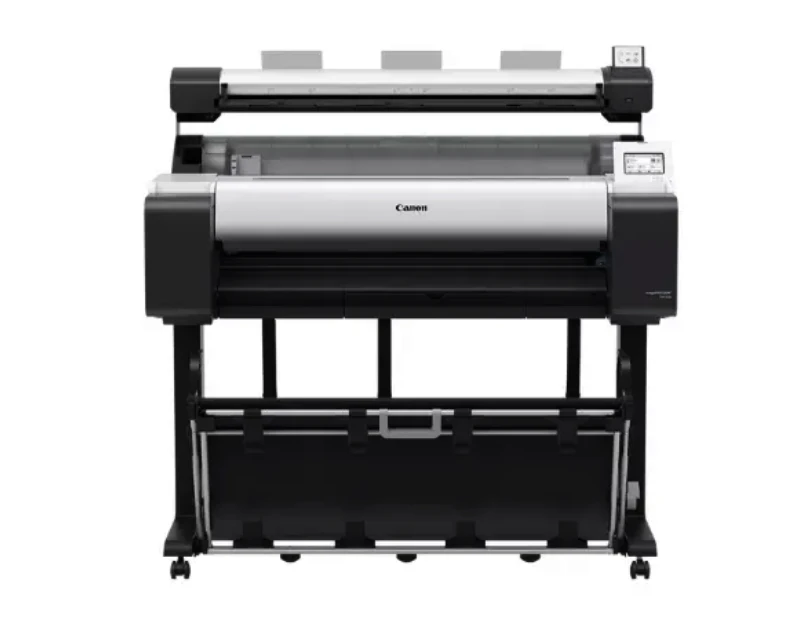
The Canon imagePROGRAF TM-350 MFP Lm36 is designed not only for outstanding large-format printing and scanning but also for helping businesses save money in the long run. With its advanced ink system, efficient media handling, and low-maintenance design, it offers practical solutions for reducing operational costs while maintaining premium print quality. In this article, we explore several strategies for minimizing expenses when using the Canon imagePROGRAF TM-350 MFP Lm36.
Optimize Print Settings for Efficiency
One of the simplest ways to reduce printing costs is by adjusting your print settings to suit each job’s requirements. The TM-350 MFP Lm36 allows users to select draft or economy modes for internal documents that don’t require full-color saturation. By reducing ink density for non-client-facing work, you can extend the lifespan of your ink cartridges without sacrificing legibility.
Leverage the Lucia TD Pigment Ink System
The TM-350 MFP Lm36’s Lucia TD pigment inks are engineered for both quality and economy. These inks provide rich, durable colors while delivering more prints per cartridge compared to many dye-based systems. Using pigment inks also reduces reprints caused by smudging or fading, which means less wasted media and ink over time.
Choose the Right Media for the Job
Not all print jobs require premium media. For test prints, internal reviews, or temporary signage, using lower-cost paper can significantly reduce expenses. Save your high-quality coated or specialty papers for final presentations or client-facing materials. The TM-350 MFP Lm36 is versatile enough to handle various media types, allowing you to select the most cost-effective option for each project.
Reduce Waste with Precise Cutting and Nesting
The device’s intelligent media handling ensures minimal waste by optimizing the placement of multiple prints on a single sheet or roll. This “nesting” feature reduces unused paper, while the built-in cutter ensures accurate trimming, eliminating the need for manual cutting and avoiding wasted material from human error.
Schedule Regular Maintenance to Avoid Downtime
Unexpected breakdowns can be expensive, both in repair costs and lost productivity. By following a routine maintenance schedule — including nozzle checks, firmware updates, and professional servicing — you can prevent issues before they become costly problems. The TM-350 MFP Lm36’s self-cleaning functions also help keep printheads in optimal condition with minimal ink waste.
Take Advantage of Built-In Accounting Tools
The Canon imagePROGRAF TM-350 MFP Lm36 includes accounting management software that tracks ink and media usage per project or department. This feature allows you to identify where resources are being used most and implement cost controls. For example, if one department is consuming significantly more media, you can investigate the reason and suggest more efficient printing practices.
Train Staff on Best Practices
A well-trained team can significantly reduce printing costs. Provide training on selecting appropriate print modes, loading media correctly, and handling the device’s scanning and printing functions efficiently. Misprints due to incorrect settings or improper media loading can be expensive, especially with large-format jobs.
Combine Printing and Scanning in One Device
Owning separate printers and scanners can lead to higher equipment, maintenance, and space costs. The TM-350 MFP Lm36 combines both functions into a single, compact machine, eliminating the need for multiple devices. This not only reduces capital expenses but also streamlines workflow, saving time and labor costs.
Consider Bulk Purchasing of Supplies
Buying ink cartridges, printheads, and media in bulk can lead to significant discounts. Since the TM-350 MFP Lm36 uses high-capacity ink tanks, bulk purchases are practical and reduce the frequency of ordering, which also saves on shipping fees.
Embrace Digital Storage to Reduce Printing Volume
While large-format printing is necessary for certain projects, many documents can be stored and shared digitally. The TM-350 MFP Lm36’s high-resolution scanning capability allows you to digitize large drawings, plans, and posters for electronic distribution. By reducing the number of physical prints, you save on both ink and paper costs.
Plan Your Print Runs Strategically
Grouping similar print jobs together can help reduce media changes and cleaning cycles, which in turn saves ink and time. The TM-350 MFP Lm36’s queue management tools make it easy to organize print runs efficiently, ensuring the printer operates continuously without unnecessary interruptions.
Monitor Usage Trends for Long-Term Savings
Regularly review the accounting software’s reports to identify trends in media and ink usage. Over time, these insights can help you refine your printing policies, negotiate better supply deals, and adjust workflows to minimize costs.
Conclusion
The Canon imagePROGRAF TM-350 MFP Lm36 is not only a high-performance large-format printing and scanning solution but also a valuable tool for controlling operational expenses. By optimizing print settings, choosing the right media, leveraging built-in software tools, and training staff, you can significantly reduce printing costs without sacrificing quality. With careful planning and the TM-350 MFP Lm36’s cost-efficient features, businesses can achieve both premium output and long-term savings.













Sign in to leave a comment.