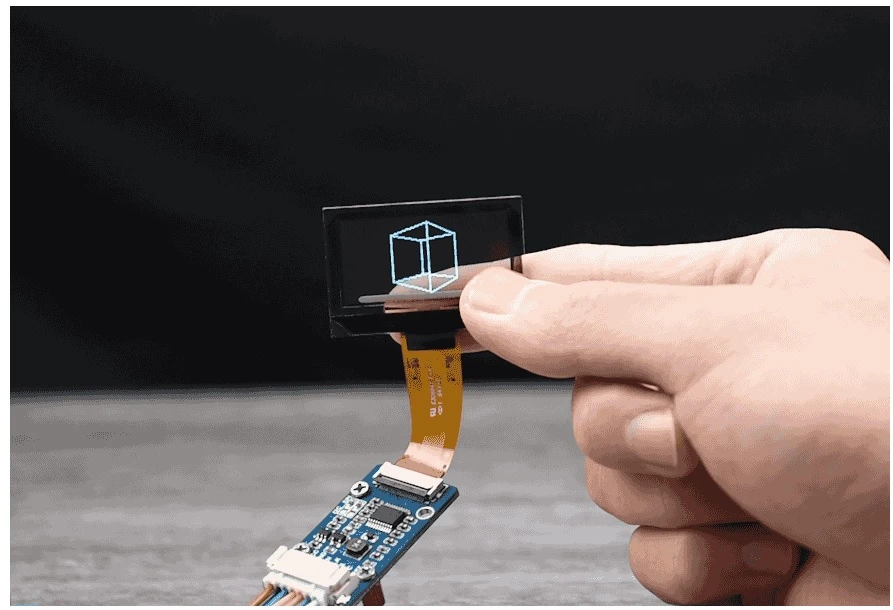
In the world of Arduino development, selecting the right display is key to building efficient and compact devices. Whether you're designing a wearable gadget, a sensor interface, or a portable diagnostic tool, the display plays a central role in user interaction and real-time data visualization. Among the many options available, Micro OLED displays stand out for their sharp resolution, low power consumption, and small form factor.
Golden Morning LCD has emerged as a trusted source for high-quality Micro OLED displays tailored to meet the needs of Arduino enthusiasts and professionals alike. This article walks you through the key steps to selecting and integrating the perfect Micro OLED display for your next Arduino project with the help of Golden Morning LCD.
Step 1: Define Your Project Requirements
Before choosing any display module, it’s essential to clearly outline the goals and constraints of your project. Consider the following:
- Display size: What is the maximum allowable size based on your enclosure or form factor?
- Resolution: Do you need to display simple text, detailed graphics, or animations?
- Power consumption: Is the project battery-powered or mains-powered?
- Interface compatibility: Does your Arduino board support I2C or SPI communication?
- Environmental durability: Will the display be exposed to heat, cold, or moisture?
Golden Morning LCD offers a wide range of Micro OLED displays with sizes typically ranging from 0.49 to 1.3 inches, resolutions up to 128x64, and support for both I2C and SPI protocols, making them suitable for a broad variety of applications.
Step 2: Choose the Right Micro OLED Module
Once your requirements are defined, selecting the right OLED module becomes easier. Golden Morning LCD provides several reliable options for Arduino projects:
- 91-inch 128x32 OLED: Great for compact text display or status messages
- 96-inch 128x64 OLED: A versatile choice for combining text and simple graphics
- 3-inch 128x64 OLED: Ideal for more advanced interfaces or larger handheld devices
These modules are available in both white and blue display colors and are typically compatible with popular Arduino libraries such as U8g2 and Adafruit SSD1306.
Each OLED display from Golden Morning LCD is engineered for durability and consistent contrast performance, which is crucial for long-term embedded applications.
Step 3: Check for Interface and Power Compatibility
Golden Morning LCD’s Micro OLED displays are usually designed with either an I2C or SPI interface, and some support both. Most Arduino boards—including Uno, Nano, and Mega—support both protocols. Enhance your embedded project with a micro oled display arduino from Golden Morning LCD.
Ensure that:
- Your chosen OLED module matches the interface you intend to use
- The module operates at either 3.3V or 5V, depending on your board’s logic level
- You know the correct wiring for GND, VCC, SCL, and SDA (for I2C) or MOSI, SCK, CS, and DC (for SPI)
Golden Morning LCD provides complete datasheets and pin definitions to assist with wiring and connection.
Step 4: Integrate the OLED into Your Arduino Sketch
Golden Morning LCD’s OLED modules work seamlessly with commonly used Arduino libraries. To get started quickly:
- Install a compatible library
- Use the Arduino IDE Library Manager to install Adafruit SSD1306 and Adafruit GFX, or U8g2, depending on the chipset used in your OLED module.
- Connect the module
- Carefully wire the OLED to your Arduino according to the module’s pinout and your board’s available pins.
- Upload example code
- Use example sketches provided in the library to test your display. These sketches include text scrolling, image drawing, and sensor data visualization.
- Customize the display
- Once verified, you can write your own code to render data from sensors, show real-time status, or create user menus.
Golden Morning LCD ensures that their OLED displays are plug-and-play compatible with standard libraries, making software integration easy and efficient.
Step 5: Optimize for Power and Space
For battery-powered or wearable Arduino projects, conserving energy is critical. Micro OLEDs from Golden Morning LCD are inherently energy-efficient, but you can further optimize performance by:
- Turning off the display when idle using library functions
- Minimizing screen brightness (if adjustable)
- Refreshing only the necessary areas of the display
- Using sleep modes in your Arduino board when possible
Additionally, the small footprint of these displays helps reduce overall device size and weight, which is especially important in compact and mobile applications.
Step 6: Test and Iterate Your Prototype
With the display connected and code integrated, run your Arduino project in its intended environment. Look for:
- Legibility: Is the text or graphic clearly visible in all lighting conditions?
- Responsiveness: Does the display update fast enough for your needs?
- Stability: Does the screen flicker or show signs of voltage instability?
Golden Morning LCD’s displays are manufactured with quality assurance measures, ensuring consistent performance even after extended use. However, iterative testing will help refine your code and design for optimal results.
Step 7: Scale Up with Custom Solutions
If you are working toward product development or mass production, Golden Morning LCD also offers custom display services. These services include:
- Tailoring display sizes, resolutions, or pin layouts
- Custom interface or connector designs
- Branding or integrating display into your product enclosure
- Support for integrating with PCBs or housing components
Their engineering team works closely with clients to ensure seamless integration of OLED displays into consumer and industrial products.
Conclusion
When it comes to building powerful yet compact Arduino projects, the right display can make all the difference. Golden Morning LCD’s Micro OLED modules offer the perfect balance of size, clarity, power efficiency, and compatibility. From hobbyists and students to professional engineers, these displays provide a reliable foundation for a wide range of creative and commercial applications.
By following the above steps—from requirement planning to full-scale integration—you can ensure that your project not only functions effectively but also looks polished and professional. With trusted support, durable designs, and precision manufacturing, Golden Morning LCD remains a top choice for Micro OLED displays in the Arduino ecosystem.











Sign in to leave a comment.