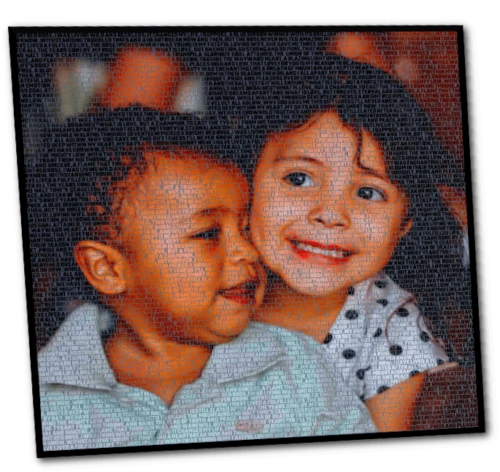

In a world where digital creativity continues to evolve, word-art portraits have become one of the most unique and personalized ways to transform ordinary photos into stunning visual masterpieces.
Whether you're commemorating a special moment, creating a heartfelt gift, or decorating your home with something meaningful, word-art images offer a beautiful blend of imagery and typography.
If you’re new to text-art portraits or wondering how the process works, this guide will walk you through everything you need to know to create your own personalized piece.
1. Choose the Perfect Photo
A meaningful word-art portrait starts with the right photo. Select an image that has:
- Clear, well-defined subject(s)
- Good lighting and balanced contrast
- A face or shape that stands out
- Emotional or personal value
Portraits, couple photos, family pictures, and pet images tend to work especially well. Remember: The clearer the details, the better the text art result.
2. Pick the Words That Matter Most
The heart of a word-art portrait lies in the words you choose. These could be:
- Love letters
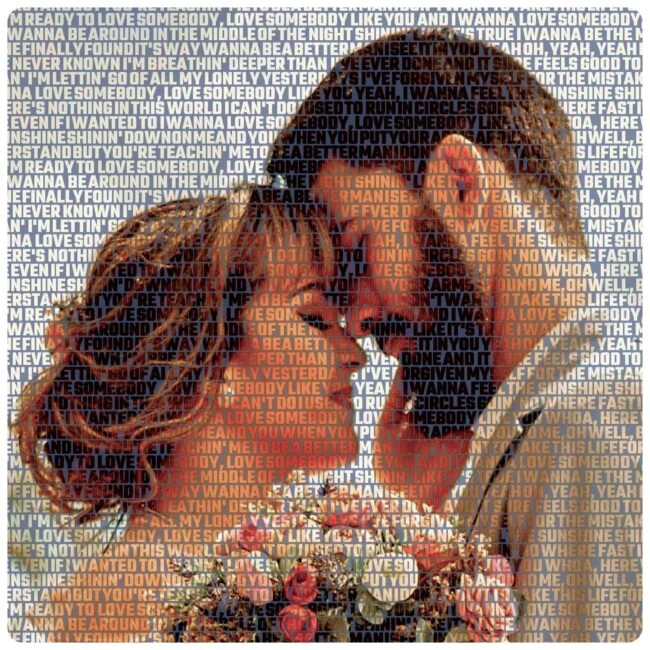
- Favorite song lyrics
- A poem
- Special dates or memories
- Names of family members
- Inspirational quotes
Using meaningful text makes the artwork far more personal and emotionally impactful—perfect for gifts or keepsakes.
3. Visit Photo-to-Text.com and Upload Your Image
Once your photo and words are ready, head to Photo-to-Text.com.
The process is simple:
- Upload your chosen photo.
- Enter the words, text, or message you want the portrait to be made from.
- Select the layout and styling options available.
The platform automatically converts your photo into a detailed text-based artwork, combining image and typography beautifully.
4. Choose Your Word-Art Style
Different images call for different styles. On Photo-to-Text.com, you can experiment with or choose:
- Full-word portraits where the entire image is built from your text
- High-contrast designs for strong silhouette effects
- Dense text styles for more detail
- Minimalist layouts for a cleaner artistic look
Your style choice will determine how bold, artistic, or emotionally expressive the final result appears.
5. Preview and Adjust Your Design
After generating the artwork, take a moment to preview it. You might:
- Adjust the amount of text
- Change spacing or density
- Try different fonts or layouts
- Re-upload a clearer photo if needed
This ensures your portrait looks exactly the way you want before downloading or ordering the final file.
6. Download or Print Your Word-Art Portrait
Once you're happy with your design, you can download your high-resolution word-art image directly. Many people go on to print theirs for:
- Wall decor
- Anniversary or birthday gifts
- Graduation presents
- Holiday surprises
- Memorial keepsakes
A printed word-art portrait is both sentimental and artistically impressive—perfect for framing or gifting.
Why Word-Art Portraits Are So Special?
What makes these portraits truly stand out is how they combine visual beauty with personal meaning. They’re not just pictures—they’re stories told through words and images. Every glance reveals another detail, another memory, another layer of emotion.
Whether you're creating one for yourself, a loved one, or a special occasion, a personalized text art generator like Photo-to-Text.com is a gift that lasts forever. You can easily turn your favorite photo into a picture made entirely with words—customized, detailed, and emotionally expressive.











Sign in to leave a comment.