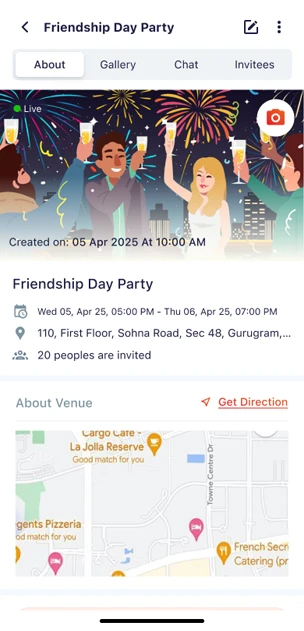

Planning an event can feel overwhelming, but with the right tools, the process becomes smooth, fun, and stress-free. That’s exactly what KqeeK offers. This powerful event planning & photo sharing app is designed to help you organize events seamlessly, collaborate with guests, and capture memories all in one place. Whether it’s a birthday, wedding, corporate gathering, or family reunion, KqeeK ensures you can set up your first event like a pro.
In this step-by-step guide, we’ll walk you through everything you need to know to create and manage your very first event on KqeeK.
Step 1: Sign Up and Set Up Your Profile
The first step is to download the KqeeK app and create your profile. A clean, personalized profile helps guests recognize you easily. Add your name, profile picture, and basic details. This makes your event invitations look more authentic and professional.
👉 Pro Tip: Use a clear profile picture and consistent name—this builds trust and makes communication easier when guests join your events.
Step 2: Create Your Event
Once your profile is ready, it’s time to set up your event. Tap the “Create Event” button and enter the essentials:
- Event Name – Keep it clear (e.g., Ananya’s 25th Birthday Bash).
- Date & Time – Double-check availability to avoid clashes.
- Venue – Add the full address or pin the location for easy navigation.
- Event Description – Share details like theme, dress code, or special instructions.
This step ensures your guests have all the important details at their fingertips.
Step 3: Customize Your Event Page
What makes KqeeK unique is the ability to customize your event page. You can upload a cover photo, choose a theme, and add fun details that reflect the personality of your event. This makes the invitation more exciting and engaging for your guests.
👉 Pro Tip: Use high-quality images to make your event stand out. Visual appeal plays a big role in creating excitement.
Step 4: Invite Your Guests
No event is complete without guests! On KqeeK, you can send invitations directly via the app. Simply import your guest list from your phone contacts or add them manually. You can also share a unique event link for easy access.
The best part? KqeeK keeps track of RSVPs in real time. You’ll know exactly who’s attending, which saves the hassle of follow-up calls or messages.
Step 5: Share Event Updates
Things change, and that’s okay. With KqeeK, you can post updates for your guests. Whether it’s a change in timing, a new menu, or an exciting surprise, guests stay informed instantly.
This feature ensures better communication and eliminates confusion, making it especially useful for large gatherings like weddings or corporate events.
Step 6: Capture and Share Memories
One of the most loved features of KqeeK is its built-in photo-sharing option. Guests can upload photos and videos from the event in real time, creating a shared album that everyone can access.
Instead of chasing friends for pictures later, you get a collective memory bank—perfect for reliving those special moments anytime.
👉 Pro Tip: Encourage your guests to upload their best clicks—it makes the album diverse and fun!
Step 7: Manage After the Event
Even after your event ends, KqeeK keeps the magic alive. You can download shared photos, send thank-you notes, or even create a recap of the event. This thoughtful touch helps you stay connected with your guests and leaves a lasting impression.
Why Choose KqeeK for Your Events?
KqeeK isn’t just another event management tool—it’s designed with simplicity, collaboration, and fun in mind. Here’s why first-time users love it:
- Easy setup – Anyone can create an event in minutes.
- Real-time RSVPs – Stay updated without manual tracking.
- Photo & video sharing – Build a live memory book.
- All-in-one app – No need for multiple tools or platforms.
Whether you’re planning a small family function or a large-scale event, KqeeK adapts to your needs.
Final Thoughts
Setting up your first event doesn’t have to be stressful. With KqeeK, the entire process from creating an event to sharing memories is effortless and enjoyable. This event planning & photo sharing app helps you focus less on the logistics and more on what truly matters: celebrating moments with the people you love.











Sign in to leave a comment.