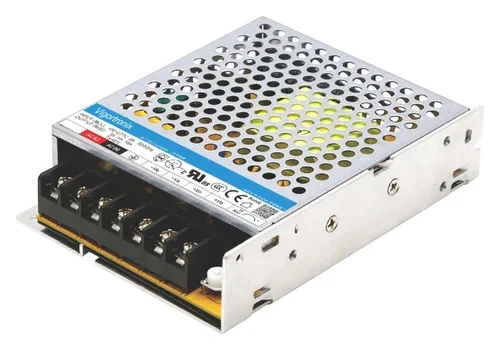

Buying an AC/DC Power Converter might seem simple at first just match the voltage, right? Not quite. Whether you’re designing a new electronic device, upgrading your setup, or replacing an old power supply, there are a few things you’ll want to keep in mind to make sure everything runs smoothly.
Here’s a breakdown of the top 7 things you should know before buying an AC to DC adapter explained in plain English.
1. Know Your Device's Power Needs
Start with the basics. Check how much voltage and current your device needs. Does it run on 5V,12V,24V? And how much current does it draw 1A,2A, more?
Always choose a DC power converter that can provide more than the minimum your device needs. That gives you extra room for power spikes or future upgrades. Choosing a converter that's too weak can lead to overheating or early failure.
If your device says it needs 12V/2A, go for a converter that can handle 12V/3A just to be safe.
2. Check the Input Voltage Range
Power outlets vary around the world. Some countries use 110V, others use 220V. A good AC/DC power supply should work across a wide input range typically 85V to 264V so you can use it safely in multiple regions.
If you’re planning to sell or ship your product internationally, or if your equipment might be moved, this is an important factor to consider.
3. Look at Efficiency Ratings
Efficiency matters a lot. It tells you how well the converter turns AC power into DC power without wasting energy as heat.
For devices that stay on 24/7, like industrial power supplies or security systems, go for a converter with at least 80% efficiency or higher. It’ll save on energy costs and reduce the chance of overheating.
Efficient converters also last longer because they run cooler.
4. Check Size, Shape, and Fit
Not all power adapters for electronics are built the same. Some are compact and designed for tight spaces, while others are bulkier with built-in fans or enclosures.
Before you buy, consider:
- How much space do you have?
- Will it be exposed or inside a case?
- Do you need a wall plug adapter or an open-frame model?
Make sure the AC to DC adapter fits both physically and functionally into your project.
5. Look for Safety Certifications
Safety should always come first. A quality power supply converter will have certifications like:
- UL (Underwriters Laboratories)
- CE (European standard)
- FCC (for electromagnetic safety)
These ensure the product has been tested and approved for safe use. If you’re using it in medical equipment, consumer electronics, or commercial installations, don’t skip this step.
6. Think About Heat and Cooling
Every electronic component generates heat, and power converters are no exception. If they get too hot, they may shut down or get damaged.
Look at the cooling requirements:
- Does it come with a built-in fan?
- Will it need a heat sink?
- Is passive airflow enough?
If you’re installing your DC power converter in a small, enclosed space, make sure it has proper ventilation or thermal protection.
7. Look for Built-in Protection Features
Accidents happen but a good converter can protect your devices when they do.
Look for models that include:
- Overvoltage protection (for power surges)
- Overcurrent protection (in case of overload)
- Thermal shutdown (to prevent overheating)
- Short circuit protection
These features can prevent serious damage to both the converter and your expensive equipment.
Plan for the Future
If you think your power needs might grow maybe, you’ll connect more devices later it’s smart to choose a converter that offers a bit more power than you need today.
It’s much easier (and cheaper) to buy a slightly more powerful AC/DC power converter now than to replace the whole thing later.
Final Thoughts
Buying a power supply isn’t just about plugging something in and hoping it works. It’s about knowing your power needs, choosing the right size and features, and making sure it’s safe and efficient for your specific use case.
Whether you’re powering LED lighting, running industrial machines, or designing your own tech product, these 7 tips will help you make the right choice.
And remember while it's tempting to go for the cheapest option, investing in a quality AC to DC adapter will save you time, money, and headaches in the long run.










Sign in to leave a comment.