
An IPTV media player becomes more efficient and convenient when paired with an Electronic Program Guide (EPG). This feature organizes channel schedules, live programs, and upcoming content into a clear, easy-to-navigate display. EPG helps users find, plan, and enjoy shows without switching channels or guessing what’s on next.
With EPG, navigating thousands of channels takes seconds instead of minutes. It turns a simple streaming setup into a structured TV experience that feels professional and complete. Most popular IPTV media players like IPTV Star or Flex IPTVViewers can check program times, see show summaries, and adjust plans around their favorite content.
This post explains how EPG enhances IPTV media player performance, how it integrates into IPTV systems, and the formats and setup options that make modern viewing smoother and more organized.
How EPG Enhances IPTV Media Player Performance
The Electronic Program Guide (EPG) makes IPTV media players more functional and efficient by organizing live and on-demand content. It gives users clear program schedules, accurate show information, and easier access to what they want to watch without guesswork or delay.
Key Functions of an Electronic Program Guide
An Electronic Program Guide (EPG) serves as a digital TV guide that displays what is currently playing, what comes next, and detailed descriptions for each program. In IPTV, this data updates automatically through formats like XMLTV, keeping users informed with real-time scheduling accuracy.
EPG systems often include information such as channel names, show titles, broadcast times, and brief summaries. Some also mark programs with icons showing genre, language, or video quality (HD/4K). This helps users quickly identify content that fits their preferences.
Most IPTV apps integrate EPG data through a URL or built-in source. Once connected, users can sort and filter programs by date or category. This structure lets them view live and future content efficiently, turning a basic player into a full-featured viewing platform.
Improved User Experience and Navigation
A strong EPG integration transforms how users interact with IPTV. Instead of manually switching through channels, viewers can use the guide to find specific titles or browse by time slots. This makes navigation faster, especially across large channel lists.
The consistent layout and visual design of EPG listings make the interface feel organized. Many IPTV apps let users change view modes—grid, list, or timeline—to match their preferences.
Below is a simple example of EPG data in use:
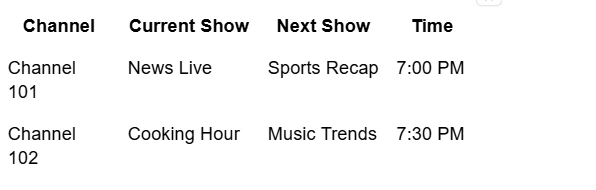
Features like reminders or notifications allow users to plan what to watch without endlessly scanning. This precision creates a more professional and efficient user experience.
Content Discovery and Personalized Scheduling
EPG systems enhance content discovery by suggesting related programs based on viewing time and channel categories. Instead of passively browsing, users can explore new series, films, or live events from an organized schedule.
Many IPTV players use EPG data to sync with personal preferences. A viewer can mark favorites, set viewing alerts, and filter programs by interest. Some EPG setups even align with time zones automatically to avoid schedule confusion.
When used with on-demand content, the guide can display both past and upcoming programs, bridging the gap between live and recorded options. This level of personalization helps users make better decisions about what to watch and when, improving engagement across IPTV platforms.
EPG Integration, Formats, and Setup in IPTV Services
Electronic Program Guide (EPG) integration lets IPTV services display channel schedules and show details accurately across different devices. It depends on standardized data formats, proper configuration inside IPTV apps, and routine maintenance to remain accurate and responsive.
EPG Data Sources and Formats: XMLTV, JSON, M3U
EPG data describes what is airing, when it airs, and on which channel. IPTV providers collect this data from different EPG sources, often through internet feeds known as EPG URLs. These feeds supply schedule details that the media player matches with each channel in the playlist.
The most common EPG formats include XMLTV, JSON, and M3U.
- XMLTV is the most widely supported and ideal for detailed metadata like episode titles, descriptions, and timing.
- JSON offers better readability for developers and may load faster on lighter IPTV systems.
- M3U, although primarily a playlist format, can include EPG mapping links that point to XMLTV or JSON feeds.
Reliable EPG performance requires valid, regularly updated data. Missing or outdated feeds often cause blank schedules, mismatched programs, or incorrect time zones. For stable results, users should verify that their IPTV app’s EPG URL matches the correct format supported by the service.
Adding and Configuring EPG in Popular IPTV Apps
Users can connect EPG feeds in IPTV apps by linking EPG URLs to their channel playlists. The process is similar across most top players—such as IPTV Star, TiviMate or Perfect Player—though the exact menu names may differ slightly.
IPTV Star- This IPTV media player uses a playlist URL to fetch the EPG data automatically.
In TiviMate, users open Settings → Playlist and enter their M3U playlist link, followed by the corresponding EPG URL.
Perfect Player provides a similar option under General Settings, where users supply both links and choose the preferred update frequency.
Once integrated, the player synchronizes program details with the channels. Users should allow a few minutes for new data to appear, especially when loading larger guides. Keeping both playlist and EPG URLs from the same IPTV provider ensures the EPG system maps channels correctly.
Troubleshooting Common EPG Issues
Common EPG issues include missing program data, inaccurate times, or mismatched channels. These problems often arise from incorrect URLs, expired feeds, or poor synchronization with the IPTV service.
To isolate the cause, users can:
- Verify the EPG source link is reachable in a web browser.
- Confirm that the M3U playlist and EPG use the same channel identifiers.
- Check local time zone settings and daylight saving adjustments in the IPTV app.
- Clear cached data and reload the EPG from the settings menu.
If the problem persists, switching to a public or alternate XMLTV source can help narrow the issue. Developers and advanced users can review logs or inspect the raw XMLTV data to confirm that entries are complete and correctly formatted.
Best Practices for Reliable EPG Performance
Maintaining a stable guide requires consistent updates and format accuracy. IPTV providers should refresh EPG data at least every 24 hours to reflect program changes. Automated tasks or scheduled fetch intervals help avoid human error and stale listings.
Users benefit from keeping their IPTV apps updated to the latest version. Modern apps often improve parsing speed and add better support for multi-format EPG integration. It is also useful to back up playlist and EPG links in case the service moves to a new feed or domain.
Minimizing network interruptions enhances loading times. Connecting through stable, high-speed internet ensures the EPG system can fetch and display updated information without delays. Routine checks and proper formatting turn EPG data from a basic add-on into a dependable navigation tool for every streaming service.
Conclusion
An IPTV media player becomes more useful and efficient when paired with the Electronic Program Guide (EPG) feature. The EPG organizes live TV schedules and content data, allowing users to browse, plan, and manage what they watch without switching between apps or menus. With clear listings and time slots, viewers can quickly find current and upcoming programs, which saves time and improves convenience.
By linking EPG data to channel playlists, the media player gains structure and context that streaming alone cannot provide. It also supports personalization since many IPTV players enable marking favorites, setting reminders, or filtering genres. Because of this, the viewing experience feels more consistent and organized across devices.
EPG also makes IPTV appear more professional and intuitive, bridging the gap between traditional and internet-based television. It enhances usability, reduces guesswork, and keeps users informed about programming changes or new releases. When functioning properly, it transforms simple streaming into a guided and flexible entertainment system.
In essence, integrating EPG into an IPTV media player creates a balance between accessibility and control, helping viewers navigate large channel lists with ease while enjoying a structured viewing schedule that feels familiar, reliable, and efficient. It allows seamless interaction between live and on-demand content, which strengthens engagement and user satisfaction. As IPTV continues to evolve, the EPG will remain a key component that defines a smarter and more user-friendly way to watch digital television.











Sign in to leave a comment.