

Teachers and school leaders are dealing with a new reality. Many students can generate full essays in minutes, then submit them as if they wrote every line. At the same time, some students write honestly and still get flagged because their style is formal, polished, or consistent. That is why learning how to check if a student used AI in an essay requires a balanced process that is fair, repeatable, and focused on evidence.
This guide covers practical, general methods you can use for free, without relying on assumptions. Near the end, you will see how Easy AI Checker works and how to use it to check essay text for free in a structured way.

Start with fairness and a clear goal.
Before you “check,” define what you are trying to learn. The goal should not be punishment. The goal should be academic integrity and skill-building. When a student relies heavily on AI, they often miss the learning objective: planning, reasoning, and communicating ideas clearly.
A fair process also protects students who write in a strong, consistent style. If your process only looks for “perfect writing,” you will create unfair outcomes.
A helpful mindset is to build a teacher checklist to detect AI in essays that uses multiple signals, not one quick judgment.
Look for writing signals that suggest AI involvement
AI writing often has patterns. These patterns do not prove anything alone, but they can guide what to review next.
Check the essay for generic language.
A common AI sign is content that says many correct things without committing to a clear position. You may see safe, broad claims with few specifics.
Examples of generic language include:
- Definitions without a clear point
- Explanations that sound like a textbook summary
- Paragraphs that repeat the same idea using different words
This is one of the clearest signs of AI-generated essay writing in college assignments because students using AI often submit text that sounds helpful but not personal.
Watch for a smooth, uniform rhythm.
Many AI drafts have consistent paragraph length, similar sentence patterns, and repeated transitions. Human writing usually has more natural variation as ideas become harder or easier.
If the essay feels “even” from start to finish, take a closer look. This connects to how to spot ai writing in student essays because uniformity is often a stronger signal than grammar quality.
Look for weak evidence and missing lived context.
Strong student essays typically show effort in how they connect ideas, explain examples, or use course-specific details. AI drafts may mention “research shows” without citing anything, or use examples that feel vague and interchangeable.
If the student uses sources, check whether they match the reading list, lecture content, or assigned materials.
Check for alignment with the prompt and class content
Many AI essays drift away from the assignment prompt because the draft is created from a general interpretation of the topic.
Compare the thesis to the prompt.
Ask: Does the thesis answer the exact question? Or does it answer a broader question that sounds related?
When students use AI, you may see a thesis that is technically correct but not targeted. This supports how to review essay drafts for AI patterns because prompt alignment is easy to test and hard to fake without understanding.

Check whether examples match your course.
Course-specific references can reveal authorship. If the assignment expects students to use your lecture terms, required readings, or case studies, verify that the essay uses them correctly and consistently.
AI can mention concepts, but it often struggles with class-specific framing unless the student provides the exact course materials.
Use process evidence instead of only style
Style is subjective. The process of evidence is more objective.
Ask for planning artifacts
If you suspect heavy AI use, request one or more of the following:
- An outline created before writing
- Notes or reading highlights
- A rough draft with visible changes
- A short reflection on how they developed the thesis
This is not about accusing. It is about confirming learning. It also fits questions to ask students about essay sources and process because you are asking about workflow, not blaming.
Run a short oral check-in.
A two to five-minute conversation can clarify a lot. Ask the student to explain:
- Why they chose the thesis
- How they selected one key example
- What they would change if revising
If they wrote it, they can usually explain their choices in a natural way. If they cannot, that is a signal to investigate further.
Check consistency of voice and personal writing habits
Students have patterns in their writing. Those patterns may include favorite words, sentence length, and how they structure paragraphs.
Compare with earlier work.
If you have prior writing samples, compare:
- How they introduce topics
- How they handle transitions
- How they use examples
- How they make claims and support them
A sudden jump in tone can be a sign, but keep ESL and tutoring factors in mind. This connects to how to check essay consistency and personal voice because consistency is often more telling than quality.
Look for contradictions in tone.
Some AI-assisted essays have a strange mix: advanced vocabulary next to simple reasoning, or polished paragraphs next to unclear logic. Humans can do this too, but it is worth checking.
Look for “too perfect” citation behavior.
AI can invent citations or use sources that do not match the task.
Check for:
- Missing page numbers when required
- Unusual source choices that were not discussed in class
- Citations that do not support the sentence they follow
- References that do not exist in the bibliography
If the student has real sources, ask them to show where a quoted line appears. This is a fair integrity check for any student.
Avoid false positives with a careful approach.
False positives can harm trust. They also create a fear-based environment where students feel accused for writing well.
Recognize common false positive triggers
Human writing may look “AI-like” when:
- The student uses a structured template
- The essay follows a predictable academic format.
- The writer is very formal or careful.
- The student is a strong editor.
This is why how to reduce ai detection false positives in essays should be part of your process.
Use multiple signals before taking action
A stronger approach is to gather at least three categories of evidence:
- Style signals (uniformity, vague language)
- Task alignment issues (prompt mismatch, course mismatch)
- Process gaps (no outline, cannot explain choices)
When you do this, you also support how to handle suspected AI use fairly in classrooms because you can explain your reasoning clearly.
A simple, free workflow you can repeat
Here is a repeatable workflow for educators:
- Read the essay once for meaning and prompt alignment.
- Note any generic sections, repeated structure, or vague evidence.
- Compare with earlier writing samples if available.
- Request planning artifacts if concerns remain.
- Use an AI checker as one signal, not the final verdict.
This is a strong free AI essay checking workflow for educators because it balances human judgment with consistent steps.
How Easy AI Checker works
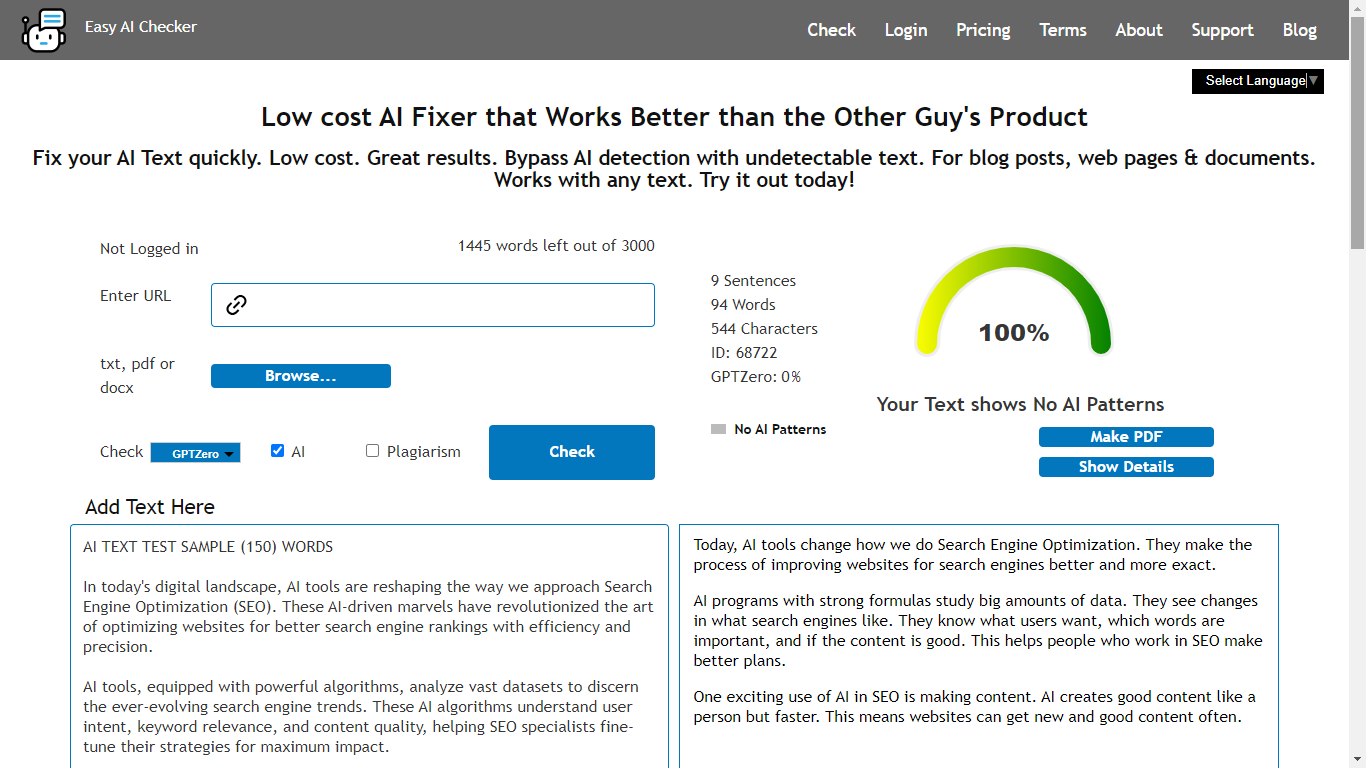
Easy AI Checker provides an interface where you can check content using multiple inputs. On its check page, you can enter a URL, upload files (TXT, DOCX, PDF), or add text directly, and it shows a 1500-word limit indicator on the page.
It offers two modes: AI and Plagiarism.
For AI checking, Easy AI Checker shows three outcome labels:
- Likely AI-generated content
- Mix of AI and Human
- Human-generated content
It also includes an on-page warning not to click the Analyze button too fast.
Finally, Easy AI Checker states that content submitted on the website is stored for 60 days for quality control, and that its detector model currently supports English text.
How to check if a student used AI in an essay for free using Easy AI Checker
This section shows exactly how to use Easy AI Checker as part of a fair classroom process.
Prepare the essay text for a clean check
Keep the input focused on the student’s writing
If the essay includes the full assignment prompt, rubric, or long quoted passages, remove those parts before checking. You want the checker to analyze the student’s original writing, not repeated text from other sources.
This improves accuracy and supports best practice steps to confirm AI use in essays in a practical way.
Check the length and break it into sections if needed.
Easy AI Checker shows a 1500-word limit indicator on the page. If the essay is longer, test the most important sections first, such as the introduction, one body section, and the conclusion.
Use Easy AI Checker with pasted text.
Step 1: Open the check page
Go to the Easy AI Checker check page, where you see the text area labeled “Add Text Here.”
Step 2: Paste the student’s essay text
Paste the cleaned essay text into the input box. Then scan the first and last lines to confirm the full selection pasted correctly.
Step 3: Select AI mode
Choose the AI option, not Plagiarism, when your goal is to estimate whether the writing seems AI-generated.
Step 4: Click check once and wait
The page warns users not to click the Analyze button too fast. Click once and allow the tool to complete the check.
Step 5: Interpret the label carefully
Easy AI Checker returns one of three labels. Use the label as a signal, not a verdict:
- If it says “Likely AI-generated content,” review the sections you flagged earlier and request process evidence.
- If it says “Mix of AI and Human,” the student may have used AI for a draft and then edited, or the essay may include uneven sections.
- If it says “Human generated content,” keep your focus on prompt alignment and source quality, since even human writing can still have integrity issues.
This is a practical way to run a step-by-step, easy ai checker for student essays without overreacting to one result.
Use Easy AI Checker with file upload when needed
When to upload a file
If you receive an essay as a document or PDF, Easy AI Checker allows file uploads and indicates it accepts TXT, DOCX, and PDF files.
Basic upload steps
- Use the Browse upload option.
- Select the file type that matches the student submission.
- Choose AI mode and run the check once.
If the PDF contains tables, cover pages, or heavy formatting, consider pasting only the core essay text instead. This reduces noise and improves the quality of the signal.
Keep privacy and language support in mind.
Easy AI Checker states that anything placed on the website is stored for 60 days for quality control and that the detector model currently supports English text.
If student work is sensitive, follow your institution’s privacy guidance before uploading. If the essay is not in English, results may be less reliable.
What to do after you get a result
A tool result should trigger the next step, not an automatic conclusion.
- If concerns remain, request an outline, notes, or a short revision plan.
- Ask the student to explain one paragraph and why it supports the thesis.
- Offer a rewrite opportunity that focuses on learning, not punishment.
This approach protects honest students while still addressing misuse.
Conclusion
Checking whether a student used AI in an essay works best when you use a fair process. Start with prompt alignment, evidence quality, and voice consistency. Gather process artifacts when needed. Then use Easy AI Checker as one supporting signal, not the only decision-maker. When you combine these steps, you improve integrity and keep the focus on learning.












Sign in to leave a comment.